App Store header and search results videos: what Apple accepts and how to make one
The two App Store images I wrote about last month do not have to be images. Apple calls them creative assets, and the product page header and the search results asset can each be a video of 5 to 30 seconds that plays muted and loops. The header is exactly 3840 × 1646. The search results video is 3:2, from 1920 × 1280 up to 3840 × 2560. Both run at 30 or 60 fps. Through the App Store Connect API a video is an appAssetLibraryVideos, placed with a video relationship where an image uses image. Neither needs a new version of the app: a video is reviewed by itself and then goes on the version that is already live. Here are the two I made for GPX Explore, and what each step taught me.
Header and search results video: size, length and format
From Apple’s specifications, and the same numbers from the API itself (GET /v1/appAssetLibraryRefData, under videoSpecs):
| Header video | Search results video | |
|---|---|---|
| Size | exactly 3840 × 1646 (21:9) | 3:2, from 1920 × 1280 to 3840 × 2560 |
| Frame rate | 30 or 60 fps | 30 or 60 fps |
| Length | 5 to 30 seconds | 5 to 30 seconds |
| File | .mp4, .m4v or .mov, up to 500 MB |
the same |
| Sound | muted, the viewer can unmute | muted, cannot be unmuted |
Four things the table does not say:
- A slot holds one asset. The video replaces the image, it does not sit beside it. Its poster frame is the still people see before it plays.
- No audio track is needed. The reference data says
audioRequired: false. - There is no universal video. The 16:9 asset that serves both slots at once is an image only.
- Apple names no codec. What it processed for me: H.264 High, yuv420p, BT.709, 30 fps constant, a silent stereo AAC track, MP4 with the index at the front. The header went up at Level 5.1. A 3840 × 2560 frame is 38,400 macroblocks, more than Level 5.1 allows (36,864), so the search video is Level 6.0, and that was accepted too.
The content rules are the ones for the images: no prices, no URLs, no other stores, nothing you cannot back up.
How to make a header video that loops with no seam
The header plays behind the back and share buttons, above the app’s name, for as long as the page is open. So it should be calm, and the point where it starts over must not show.
GPX Explore’s header image is a real ride of mine in the app’s 3D view. The video is the same picture with the camera swaying:
heading(t) = 188° + 12° × sin(2π × t / 24 s)A sine comes back to where it started, moving at the speed it started with. Frame 720 would be the same as frame 0, so the loop has no jump in position and none in speed. I render frames 0 to 719 and do not repeat the first one at the end.
Render it, do not record it. A screen recording has a window to crop, uneven frame timing and whatever size your display gives you. The app already draws its 3D scene with SceneKit, so a debug-only export steps the camera by frame number and takes each frame off screen at exactly the size Apple wants:
let size = CGSize(width: 3840, height: 1646)
for frame in 0..<720 {
    let t = Double(frame) / 30
    setCamera(heading: 188 + 12 * sin(2 * .pi * t / 24))      // the frame number sets the camera, not the clock
    let image = renderer.snapshot(atTime: 0, with: size, antialiasingMode: .multisampling8X)
    write(image, frame: frame)                                  // lossless PNGs; ffmpeg makes the file
}
The 720 frames took 6 minutes 14 seconds on my MacBook Pro. Three things mattered:
- Freeze the content first. Wait until every map tile is in and keep one level of detail for the whole clip. A tile that sharpens halfway through is a visible jump every 24 seconds.
- Measure the seam. The mean pixel difference between the last frame and the first was 6.27 on a 0–255 scale. Between any two neighbors it was 6.26 and 6.27. The join is one more step like the others.
- Every device crops the header, in every frame. An iPhone shows the full height but only about the middle 64 % of the width. An iPad shows the full width but about the middle 70 % of the height. With an image you check that once. With a moving camera you check both ends of the sway: my first proof showed the edge of the ground in a corner at one end, and the fix was to load more ground around the ride.

The poster is the frame at 12 seconds, where the camera is back at the heading of the image the video replaces.
A search results video that reads at the size Search shows it
Search shows the asset about 365 points wide, and there the video can never be unmuted. Apple’s advice for this slot is to “state the obvious”. For a video I took that to mean: show the app doing what it does.
The layout keeps the headline of the image version on the left. On the right stands one iPhone that does not move, and short clips play on its screen: a track on the map with its elevation chart, the same ride in 3D, then turn-by-turn navigation. Three clips of six seconds, each cross-faded into the next over half a second, the last one back into the first. That makes 16.5 seconds, and the place where it starts over is a cross-fade like the other two.
Judge it at 384 pixels, not at full size. My first navigation clip looked fine on a large screen. At the size Search shows it, it was a blue banner over a dark, empty map. I recorded it again on city streets, where the map has blocks and a park, turns as the rider takes a corner, and the banner changes to the next turn:
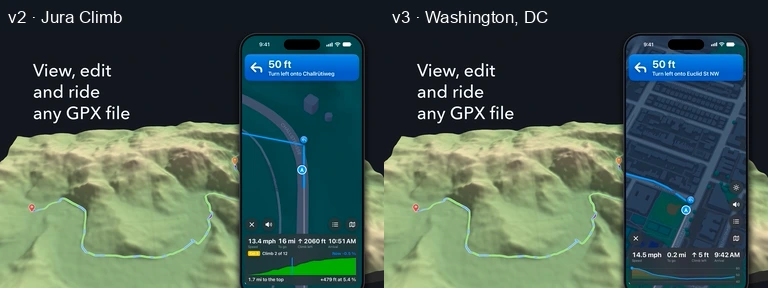
The clip shows the English app, so it goes on the English localization only. The other languages keep their images until they have clips of their own.
Encoding with ffmpeg, and one check before you upload
The frames become a file with ffmpeg. This is mine, simplified:
ffmpeg -framerate 30 -i frames/%04d.png \
  -f lavfi -i anullsrc=channel_layout=stereo:sample_rate=48000 -t 24 \
  -vf "scale=out_color_matrix=bt709:out_range=tv,format=yuv420p" \
  -c:v libx264 -preset slow -crf 17 -profile:v high \
  -color_primaries bt709 -color_trc bt709 -colorspace bt709 -color_range tv \
  -c:a aac -b:a 128k -movflags +faststart header-loop.mp4
The header came to 64 MB and the search video to 27 MB.
One encode of the search video decoded without an error in software and stopped 11 seconds in under Apple’s hardware decoder. On a Mac this shows it:
ffmpeg -v error -xerror -hwaccel videotoolbox -i search-loop.mp4 -f null -Forcing a keyframe there (-force_key_frames 11) fixed it. Run both decoders before you upload, and check the size, frame rate and length with ffprobe: Apple looks at the footage only after the upload, in processing.
Uploading a video with the App Store Connect API
It is the image upload from the earlier post on another resource, plus a poster frame. API, H and rel are the helpers from that post.
def upload_creative_video(asset_library_id, path, poster="00:00:12:00"):
    data = Path(path).read_bytes()
    # 1. Reserve the video in the app's asset library
    r = httpx.post(f"{API}/appAssetLibraryVideos", headers=H, json={"data": {
        "type": "appAssetLibraryVideos",
        "attributes": {"category": "CREATIVE_ASSETS", "fileName": Path(path).name, "fileSize": len(data)},
        "relationships": {"assetLibrary": rel("appAssetLibraries", asset_library_id)}}})
    r.raise_for_status()
    video = r.json()["data"]
    url = f"{API}/appAssetLibraryVideos/{video['id']}"
    # 2. PUT each part where Apple says, with Apple's headers and no bearer token
    for op in video["attributes"]["uploadOperations"]:
        part = data[op["offset"]: op["offset"] + op["length"]]
        headers = {h["name"]: h["value"] for h in op.get("requestHeaders", [])}
        httpx.request(op["method"], op["url"], content=part, headers=headers, timeout=600).raise_for_status()
    # 3. Commit: `uploaded` alone, no checksum
    httpx.patch(url, headers=H, json={"data": {"type": "appAssetLibraryVideos", "id": video["id"],
        "attributes": {"uploaded": True}}}).raise_for_status()
    # 4. Wait for processing
    for _ in range(180):
        a = httpx.get(url, headers=H).json()["data"]["attributes"]
        if a["state"] not in ("AWAITING_UPLOAD", "UPLOAD_COMPLETE", "PROCESSING"):
            break
        time.sleep(5)
    if a["state"] == "FAILED":
        raise RuntimeError(a.get("stateDetails"))
    # 5. The poster frame, as hh:mm:ss:ff
    httpx.patch(url, headers=H, json={"data": {"type": "appAssetLibraryVideos", "id": video["id"],
        "attributes": {"previewFrameTimeCode": poster}}}).raise_for_status()
    return video["id"]
Placing it is the place function from that post with one line changed: the relationship is "video": rel("appAssetLibraryVideos", video_id) in place of "image". The placement types are the same two, PRODUCT_PAGE_HEADER_ASSET and APP_STORE_SEARCH_RESULTS_ASSET.
Details worth knowing:
- The states I saw were
UPLOAD_COMPLETE, thenCOMPLETE, thenPREPARE_FOR_SUBMISSIONwithspecIdfilled in. That id names the entry in the reference data your file matched, so it tells you Apple read the file as the kind of video you meant. The header got there in about ten minutes, the search video in under a minute. - Set the poster after processing. With app previews, a poster sent along with the upload was replaced by Apple’s own choice, the frame at five seconds. The poster belongs to the video, so it applies everywhere the video is placed.
- A video Apple cannot process reads
FAILED, with the reason instateDetails. The footage of an asset cannot be replaced: delete it and reserve a new one. - Placing means deleting first. A slot holds one asset, so the placement that is there has to go before the new one is created. On a version you are still editing that is fine.
Adding a header or search video without a new app version
Creative assets are reviewed apart from the app. Upload the video to the Asset Library without placing it, submit the asset for review by itself, and once it is approved choose it on the live version’s page under Header and Search Results › Browse Assets › Publish. No new build and no new version, and an approved asset can be swapped in later the same way.
For a version that is already on the store this is the only route. It takes approved assets only, and deleting its placement through the API is not something to try there.
Apple reviews only one submission without an app version at a time per platform. So send the header and the search video in the same submission.
My command line refuses to place anything on a version that is not editable, and has a switch for the library:
asc.py creative upload --bundle-id <id> --library --header header-loop.mp4 --frame 00:00:12:00
asc.py creative upload --bundle-id <id> --library --search search-loop.mp4 --frame 00:00:02:00
asc.py creative upload --bundle-id <id> --version <v> --header header-loop.mp4 --frame 00:00:12:00
What I do not know yet
- When a device shows the poster and does not play. Apple does not say what Low Power Mode or the autoplay setting do here. Choose a poster that works as the image.
- Whether a video brings more downloads than a still. Product page optimization in App Store Connect can test either slot, the live page against up to three alternatives. It needs traffic. By the usual sample-size arithmetic, a 20 % difference takes around 500 first-time downloads during the test to show, and these assets appear only on iOS 27, so devices on older versions dilute it.
Quick answers
Can the App Store product page header be a video? Yes, on iOS 27 and iPadOS 27. So can the search results asset. Each slot takes an image or a video, not both.
What size is the App Store header video? Exactly 3840 × 1646 pixels, 30 or 60 fps, 5 to 30 seconds, .mp4, .m4v or .mov, up to 500 MB.
What size is the search results video? Any 3:2 size from 1920 × 1280 to 3840 × 2560, with the same frame rates, length and formats.
Does it play with sound? It starts muted and loops. On the product page the viewer can turn the sound on. In search results it stays muted.
Do I need a new app version to add one? No. Upload it to the Asset Library in App Store Connect, submit the asset for review by itself, and publish it on the live version once it is approved.
Can one video serve both slots? No. The universal asset that covers the header and search results together is a 16:9 image.
