Ollama CORS: OLLAMA_ORIGINS and Port Binding
If a web page or a browser extension calls Ollama’s API (including its OpenAI-compatible endpoints) straight from the browser, Ollama has to allow that page’s origin. That is CORS, and Ollama’s setting for it is OLLAMA_ORIGINS.
Updated October 2026: checked against Ollama 0.40.3 on every platform, with a new section on the
403 Forbiddenthat reverse proxies and tunnels run into.
By default, Ollama accepts cross-origin requests only from localhost, 127.0.0.1 and 0.0.0.0 (http or https, any port), plus app://, file://, tauri:// and VS Code webviews. Any other web origin — a hosted web app, a browser extension, another machine on your network — needs to be allowed explicitly with the OLLAMA_ORIGINS environment variable.
Seeing “Connection blocked. Please ensure your local LLM server is running and CORS is enabled”? That message, or a 403 Forbidden in the browser’s console, means one of two things. Either Ollama isn’t running (curl http://localhost:11434 answers Ollama is running when it is), or it is running and refusing the page’s origin. The second is what the rest of this post fixes.
If a server calls your Ollama rather than a browser, CORS doesn’t come into it; see Reach your local Ollama from a cloud server with Tailscale.
Check whether CORS is enabled
curl -X OPTIONS http://localhost:11434 -H "Origin: http://example.com" -H "Access-Control-Request-Method: GET" -IHere we are checking if origin example.com is allowed
If you get this output
HTTP/1.1 403 Forbidden
Allow: HEAD, GET
Date: Mon, 12 Oct 2026 20:38:09 GMT
Content-Length: 0
It means CORS is not enabled for that origin.
Enable CORS
On macOS
If you use the Ollama desktop app, set the environment variable with launchctl:
launchctl setenv OLLAMA_ORIGINS "*"or only the origins you would like, for example
launchctl setenv OLLAMA_ORIGINS "https://example.com,https://app.example.com"Then quit and restart the Ollama app from the menu bar. A launchctl setenv lasts until you log out or restart the Mac, so run it again after a reboot.
If you run the server from the terminal instead, you can pass the variable inline:
OLLAMA_ORIGINS="*" ollama serveBinding
Ollama listens on port 11434 only on localhost. The newer desktop app has a built-in toggle for this: Settings → Expose Ollama to the network. That is the easiest way.
To do the same thing manually:
launchctl setenv OLLAMA_HOST "0.0.0.0"You need to restart Ollama after doing this.
On Windows
Quit Ollama from the system tray first. Then open Settings (Windows 11) or Control Panel (Windows 10), search for environment variables, and click Edit environment variables for your account.
Add the variables OLLAMA_HOST and OLLAMA_ORIGINS depending on your requirements, then start Ollama again from the Start menu.
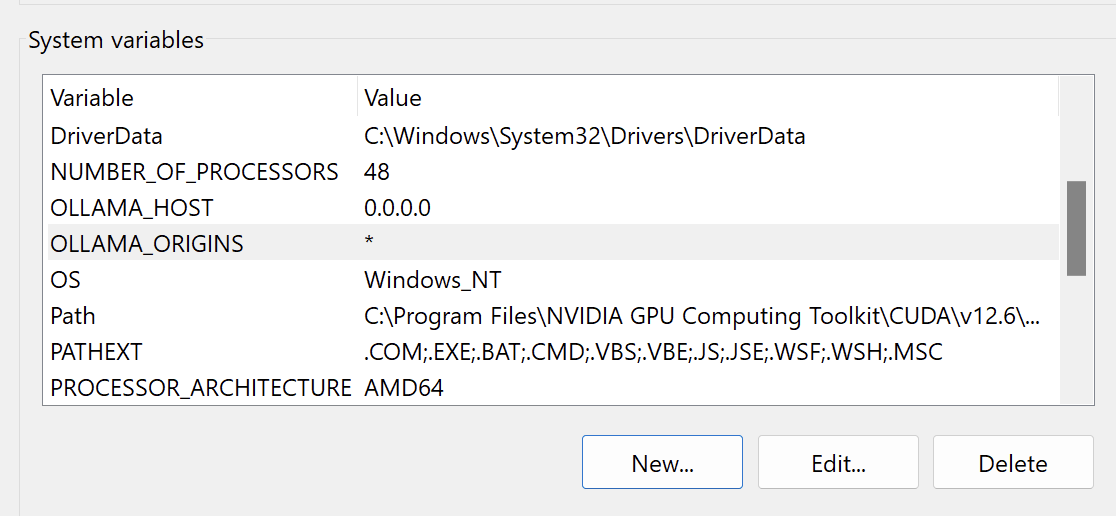
The Windows desktop app also has the Expose Ollama to the network toggle in its settings for network binding.
For a one-off session in PowerShell:
$env:OLLAMA_ORIGINS="*"; ollama serveOn Linux
Edit the ollama.service using the following command
sudo systemctl edit ollama.serviceAdd the following environment variables
[Service]
Environment="OLLAMA_HOST=0.0.0.0"
Environment="OLLAMA_ORIGINS=*"
Then reload and restart the ollama service
sudo systemctl daemon-reload
sudo systemctl restart ollama
Docker
Pass the variables with -e when starting the container:
docker run -d \
  -e OLLAMA_ORIGINS="*" \
  -v ollama:/root/.ollama \
  -p 11434:11434 \
  --name ollama ollama/ollama
The container already listens on all interfaces internally, so -p 11434:11434 handles the binding — OLLAMA_ORIGINS is the only variable you need for browser access.
Browser Extensions
Browser extensions have their own origin schemes, so a wildcard on regular domains won’t cover them. To allow extensions to call Ollama:
OLLAMA_ORIGINS="chrome-extension://*,moz-extension://*,safari-web-extension://*"Set this using the platform-specific method above (launchctl, environment variables, or systemd).
Testing
Your output should be like below if everything is setup right for Origins
$ curl -X OPTIONS http://localhost:11434 -H "Origin: http://example.com" -H "Access-Control-Request-Method: GET" -I
HTTP/1.1 204 No Content
Access-Control-Allow-Headers: Authorization,Content-Type,User-Agent,Accept,X-Requested-With,Openai-Beta,X-Stainless-Arch,X-Stainless-Async,X-Stainless-Custom-Poll-Interval,X-Stainless-Helper-Method,X-Stainless-Lang,X-Stainless-Os,X-Stainless-Package-Version,X-Stainless-Poll-Helper,X-Stainless-Retry-Count,X-Stainless-Runtime,X-Stainless-Runtime-Version,X-Stainless-Timeout
Access-Control-Allow-Methods: GET,POST,PUT,PATCH,DELETE,HEAD,OPTIONS
Access-Control-Allow-Origin: *
Access-Control-Max-Age: 43200
Allow: HEAD, GET
Date: Mon, 12 Oct 2026 20:37:41 GMT
To make sure the network binding is correct, check what the port is bound to.
On Linux:
$ ss -tlnp | grep 11434
LISTEN 0  4096  *:11434  *:*
On macOS:
$ lsof -nP -iTCP:11434 -sTCP:LISTEN
COMMAND   PID  USER   FD   TYPE  DEVICE  SIZE/OFF  NODE  NAME
ollama    712  gavi    3u  IPv6  0x1234        0t0   TCP  *:11434 (LISTEN)
*:11434 means the port is bound to all IPs on the machine.
Still Getting 403 Behind a Proxy or Tunnel?
If you put Ollama behind nginx, ngrok or Cloudflare Tunnel and every request comes back 403 Forbidden, the cause is not CORS. While Ollama listens only on localhost, it also checks the Host header and refuses any name it doesn’t consider local. Have the proxy send Host: localhost:11434:
location / {
    proxy_pass http://localhost:11434;
    proxy_set_header Host localhost:11434;
}
ngrok http 11434 --host-header="localhost:11434"
cloudflared tunnel --url http://localhost:11434 --http-host-header="localhost:11434"A Note on Security
Two things worth knowing before you copy-paste the wildcard everywhere:
OLLAMA_ORIGINS="*"allows any website you visit to make requests to your local Ollama from the browser. Scoping it to the specific origins you use is safer.OLLAMA_HOST=0.0.0.0exposes the API to your entire network, with no authentication by default. Only do this on networks you trust, or put a reverse proxy with auth in front of it.