Header and search results art for the iOS 27 App Store, uploaded through the API
iOS 27 gives every iOS app two new images on the App Store: a product page header (3840 × 1646) and a search results asset (3840 × 2560). Search shows the second one about 365 points wide on an iPhone, roughly a tenth of its width in pixels. So it needs one big screen of your app and a short headline, not a row of screenshots. Both upload through the App Store Connect API. Reserve an appAssetLibraryImages in the CREATIVE_ASSETS category, upload it and commit it, then create one appAssetLibraryPlacements per localization.
What Apple asks for
Apple calls these creative assets. They appear “across the App Store in iOS 27 and iPadOS 27 and later”. The header sits at the top of the product page. The search results asset is what the Search tab shows for your app. An app without one shows its in-app events, previews and screenshots there, as before. From Apple’s specifications:
| Header | Search results | |
|---|---|---|
| Size | 3840 × 1646 (21:9) | 3840 × 2560 (3:2), at least 1920 × 1280 |
| Formats | JPEG or PNG, no alpha channel | JPEG or PNG, no alpha channel |
| Safe area in Apple’s templates | x 1097–2743, y 493–1154 | x 836–3004, y 765–1795 |
The rules are on the best-practices page. No prices or discounts, no website URLs, no copyright symbols, no logos or mentions of other platforms or stores, no Apple recognitions such as Editor’s Choice, nothing you can’t back up, and content suitable for 4+. Apple’s advice for the header is “focus on a single, clear idea”. For the search asset it is “state the obvious”: show the interface. Check for an alpha channel with sips -g hasAlpha header.png. One of my intermediate files had one.
What reads at a tenth
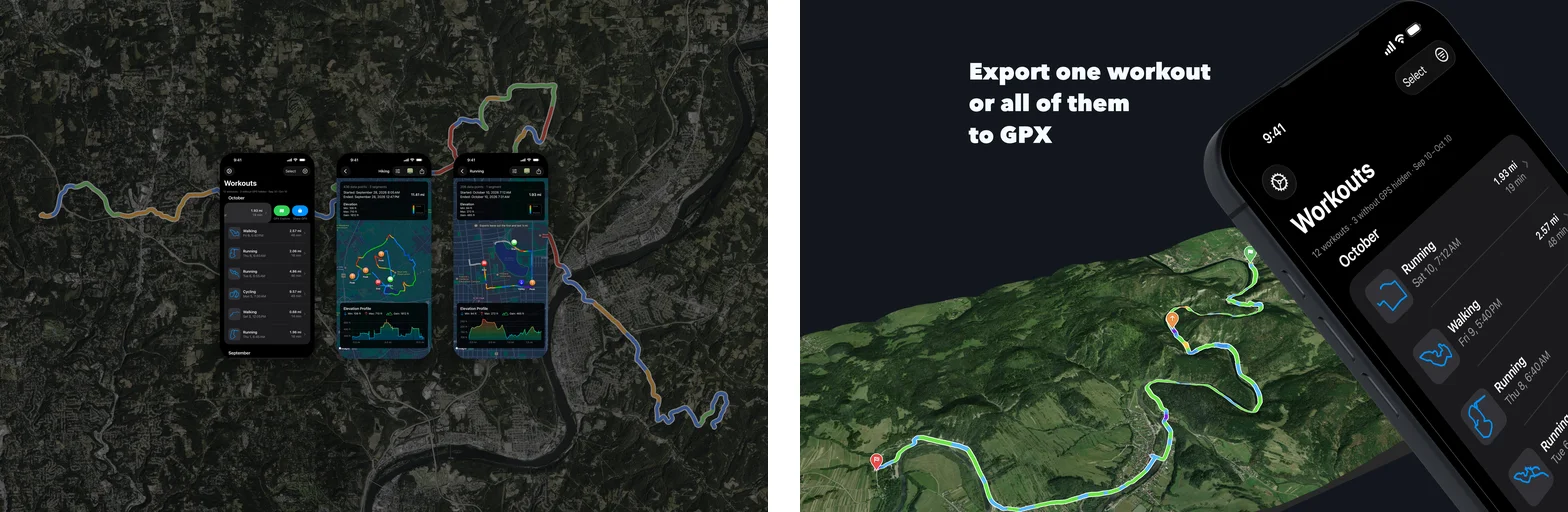
My first search asset for WorkoutGPX put three whole iPhone screenshots side by side over a satellite map. In Search each phone came out about 100 points tall, with text around 2 points. Here is that version next to the one that replaced it, at about the size Search shows them:
What I settled on, and use for every app now:
- Search results: one screen, in 3D, plus a hook. I put the app’s main screen in a tilted 3D iPhone in ButterKit (the rotation I use is 0°, −26.57°, −38.12°). Then I enlarge it until it runs off the right and bottom edges. On the left goes a short headline that makes someone stop: “Export one workout / or all of them / to GPX”. It is set in Avenir Next Heavy, white, starting at the safe area’s top-left corner. Behind both is a real ride in 3D, captured from GPX Explore. As a rule, whatever screen you use should end up at least twice the size of the capture.
- One per language. Each language gets its own headline and that language’s capture on the phone (“Séances”, “ワークアウト”, kilometers).
- The header carries no screenshot. On the product page the screenshots sit right below the header, so a phone in it only repeats them. Apple’s preview also shows the back and share buttons over the header’s top edge. WorkoutGPX’s header is just the 3D ride, edge to edge, with the whole route in frame and little sky. Since it has no text, one image serves every language.
- Check a 384-pixel copy before uploading.
sips -Z 384 search.png --out search-tenth.pngmakes one, and the headline and the screen’s title must both read in it. Do this for every language. A longer German headline ran into the phone this way and had to be shortened.
Uploading through the API
The image goes into the app’s asset library once, then a placement puts it on each version localization. Adapted from my script; token is a signed App Store Connect JWT.
import time
from pathlib import Path
import httpx

API = "https://api.appstoreconnect.apple.com/v1"
H = {"Authorization": f"Bearer {token}"}

def rel(type_, id_):
    return {"data": {"type": type_, "id": id_}}

def upload_creative(asset_library_id, path):
    data = Path(path).read_bytes()
    # 1. Reserve the image in the app's asset library
    r = httpx.post(f"{API}/appAssetLibraryImages", headers=H, json={"data": {
        "type": "appAssetLibraryImages",
        "attributes": {"category": "CREATIVE_ASSETS", "fileName": Path(path).name, "fileSize": len(data)},
        "relationships": {"assetLibrary": rel("appAssetLibraries", asset_library_id)}}})
    r.raise_for_status()
    image = r.json()["data"]
    # 2. PUT each part where Apple says, with Apple's headers and no bearer token
    for op in image["attributes"]["uploadOperations"]:
        part = data[op["offset"]: op["offset"] + op["length"]]
        headers = {h["name"]: h["value"] for h in op.get("requestHeaders", [])}
        httpx.request(op["method"], op["url"], content=part, headers=headers).raise_for_status()
    # 3. Commit: `uploaded` alone, no checksum (unlike appScreenshots)
    httpx.patch(f"{API}/appAssetLibraryImages/{image['id']}", headers=H, json={"data": {
        "type": "appAssetLibraryImages", "id": image["id"],
        "attributes": {"uploaded": True}}}).raise_for_status()
    # 4. Wait for processing
    for _ in range(60):
        a = httpx.get(f"{API}/appAssetLibraryImages/{image['id']}", headers=H).json()["data"]["attributes"]
        if a.get("state") not in ("AWAITING_UPLOAD", "UPLOAD_COMPLETE"):
            break
        time.sleep(5)
    return image["id"]

def place(localization_id, placement_type, image_id):
    # A placement can't be edited: delete the old one of this type, then create the new one
    url = f"{API}/appStoreVersionLocalizations/{localization_id}/placements"
    for p in httpx.get(url, headers=H).json()["data"]:
        if p["attributes"].get("placementType") == placement_type:
            httpx.delete(f"{API}/appAssetLibraryPlacements/{p['id']}", headers=H).raise_for_status()
    httpx.post(f"{API}/appAssetLibraryPlacements", headers=H, json={"data": {
        "type": "appAssetLibraryPlacements",
        "attributes": {"placementType": placement_type},
        "relationships": {
            "appStoreVersionLocalization": rel("appStoreVersionLocalizations", localization_id),
            "image": rel("appAssetLibraryImages", image_id)}}}).raise_for_status()
The placement types are PRODUCT_PAGE_HEADER_ASSET and APP_STORE_SEARCH_RESULTS_ASSET. The localizations come from GET /v1/appStoreVersions/{id}/appStoreVersionLocalizations. Upload the header once and place it on every localization. Upload each language’s search image and place it on that language’s localization only.
Four details worth knowing:
- The commit takes no checksum. The older
appScreenshotsandappPreviewsuploads want asourceFileChecksum, but this resource refuses one. Apple’s guide says the upload is checked against thefileSizefrom the reservation. - The upload URLs take no bearer token. Send only the headers listed in
uploadOperations. - The asset library’s id. My script passes the app’s own id, and App Store Connect accepted it. Apple’s guide reads it from
GET /v1/apps/{id}/assetLibrary, which is safer. placementGroup. Apple’s placement guide shows aplacementGroup(a device family) on screenshot placements. My script sends only the type for these two, and that is how WorkoutGPX’s art went up. If a request is refused, look up the valid groups inGET /v1/appAssetLibraryRefData.
My own command line wraps all of this:
asc.py creative upload --bundle-id <id> --version <v> --header header.png --search en-US-search.png
asc.py creative upload --bundle-id <id> --version <v> --search de-DE-search.png --locale de-DE
asc.py creative list   --bundle-id <id> --version <v>
Without --locale, an image goes on every localization of the version.
Verify
creative list reads each localization’s placements back with their type and state. A placement’s state follows the version through App Review, so the art is reviewed with the version. Then use Preview on the version in App Store Connect, which shows the header and the search result on iPhone and iPad in each language. The last check is Search on a phone after release.
How I ran into it
GPX Explore 2.1 was our first app with this art, uploaded by hand in App Store Connect. WorkoutGPX 1.6 was the second, and the first through the API. I wrote the upload code on October 10, 2026 and placed both images on all five localizations that day. When 1.6 went live on October 11, I looked it up in Search and found three tiny phones whose text I couldn’t read. WorkoutGPX 1.7, released October 12, carries the look above. Every iOS app of ours gets both images when it next ships.