Age Test
Turn the knob, play any pitch, and see who in the room still hears it.
Age Test turns an iPhone or an iPad into a tone generator for the science class. Press the aluminum knob to play, turn it to tune, anywhere from 20 Hz to 22 kHz. The microphone draws the sound as a live spectrum, so a tone nobody can hear any more is still there on the screen. And How high? finds the highest tone you hear on the headphones you have on.
iPad, iPhone
Free. No account, no ads. The microphone is only looked at, never recorded.
A tone generator on a knob
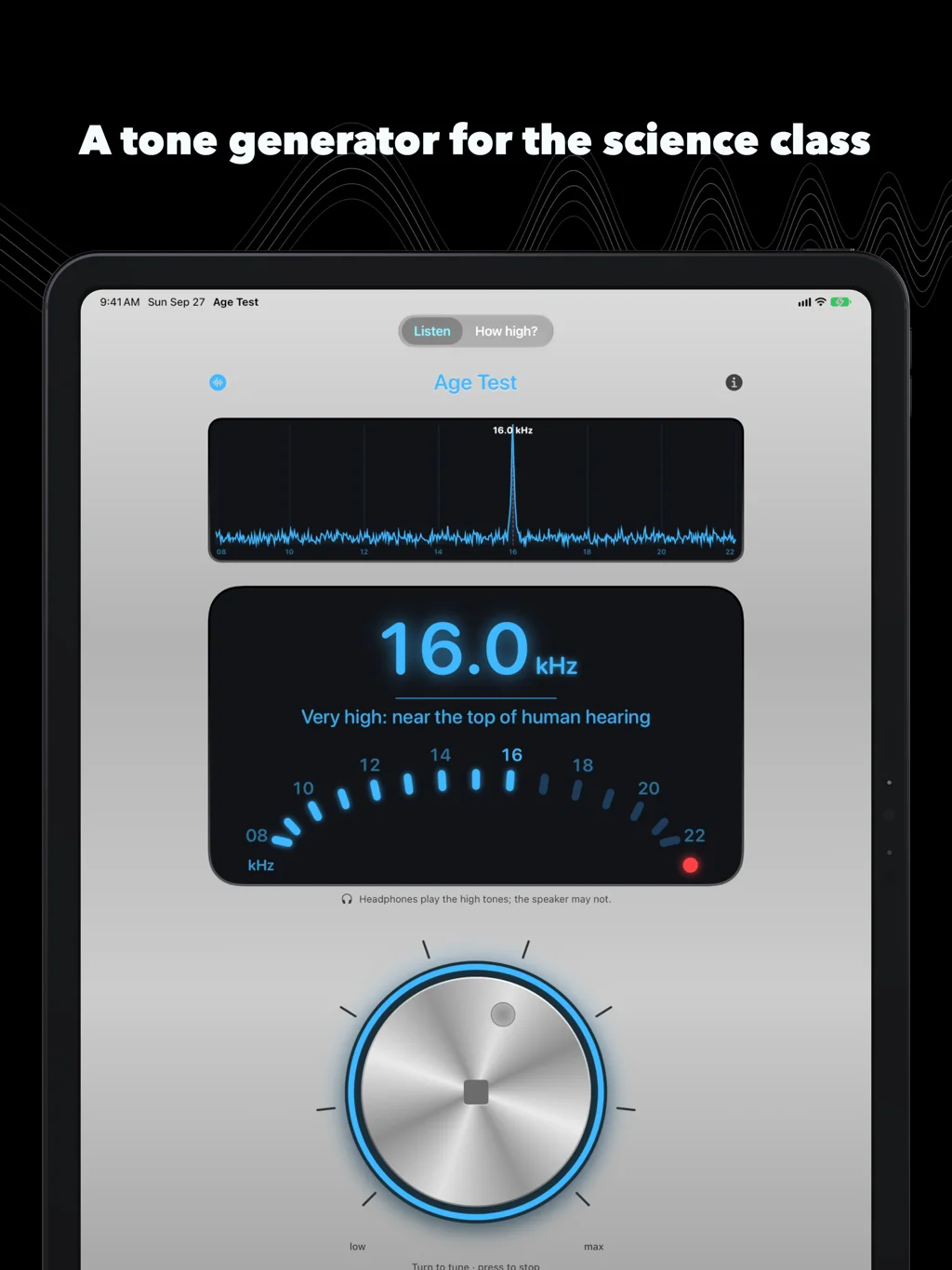
The knob is the whole instrument. Press it to play, press again to stop, turn it to change the pitch while it plays; a blue ring glows while there is sound. High covers 8 to 22 kHz in steps of 0.1 kHz, where ears differ, with a tick under your finger on every whole kilohertz. Full covers everything from 20 Hz, on a scale that gives the low notes as much room as the high ones, with a tick on every A. Play it into the left ear, the right ear or both.
The display reads the frequency, and a line under it says where that pitch sits: inside the everyday range of hearing, high, where hearing often fades with age, or very high, near the top of human hearing.
The sweep: hands up while you hear it
Tap Sweep and the tone rises slowly, from 8 kHz to 20 kHz over a minute (or from 20 Hz in the full range). Play it through a good speaker and ask the room to keep a hand up while they still hear it. The hands come down at different moments, and that is the lesson.
See the sound
Tap the speaker grille and it becomes a spectrum: the microphone listens, the screen draws every pitch it picks up, and the loudest one is named. Whistle and watch your whistle. Play 440 Hz and watch a single peak stand where an A should be. Play a sweep and watch the peak climb.
When the last hand has gone down, the peak is still there. The tone is playing; the ears are what stopped.
How high?
How high? plays tones from 8 to 20 kHz, one kilohertz apart, and you answer each one: I hear it, or I can’t. It stops at the first one you miss and shows the highest tone you reported hearing, with this equipment and volume. Some of the tones are silence, slipped in at random, and an “I hear it” on silence ends the round as a guess instead of a flattering number. It takes about a minute.
Headphones give a fairer answer than the speaker, which barely plays the highest tones, and the result belongs to the pair you used: try another pair and you may get another number. That is worth a lesson of its own.
Made not to hurt
- Every tone is a pure sine, made on the device, and capped at a quarter of full scale (−12 dBFS). There is no boost of any kind.
- Each tone fades in and out, so it never clicks. A click is heard at any age.
- How high? starts by setting a comfortable volume on the lowest tone, and stops if the volume goes up during the round. Chasing a high tone with the volume is how the next low one gets too loud.
- Nothing above 20 kHz in How high?: up there a speaker makes noises people can hear that are not the tone.
- If the headphones or the audio route can’t carry 20 kHz, How high? says so and does not give a result that would measure the equipment.
In class
- Switch to Full, play 440 Hz, and tap the grille: one peak, the A an orchestra tunes to.
- Switch to High and sweep through a good speaker. Hands up while you hear it.
- Look at the spectrum after the hands have gone down: the tone is still playing.
- Everyone runs How high? on their own headphones, then swaps pairs. Which changed the number, the ears or the headphones?
It plays with the silent switch on, and nothing needs a network or an account.
On the iPad
The same knob, larger, for the front of the room.
Privacy
No data is collected. No account, no ads, no analytics. The microphone is asked for only when you first open the spectrum, and what it hears is drawn on the screen and dropped: nothing is recorded, kept or sent. The last How high? result stays on the device.
Since 2009
Age Test first came out in June 2009, in the App Store’s first year: a brushed-metal gadget with a speaker grille, a blue display and a big knob from “low” to “max”. It played twelve tones and put an age beside each one. That is where the name comes from, and it is what people argued with in the reviews, because a high tone through a phone speaker says as much about the speaker as about the listener.
The knob is still here. The ages are not. Today Age Test plays any pitch, shows it, and tells you only what you told it: the highest tone you heard, on this equipment.
Questions
Does it tell me my age? No. How high you hear depends on your headphones and the volume as much as on your ears, so a number beside an age would only be a guess dressed as a result. Age Test gives the highest tone you reported hearing, with this equipment.
Can it tell me whether something is wrong with my ears? No. Age Test is for learning and for fun; it is not a medical device and says nothing about the health of anyone’s ears. If you are worried about your ears, see an audiologist.
Why can’t I hear the high tones through the speaker? Phone and tablet speakers roll off near the top of the range, so the tone may simply not be coming out. Age Test notices the built-in speaker and says the highest tones need headphones. The spectrum shows you whether the sound is there.
Which headphones? Any. Some wireless connections cannot carry the highest tones; How high? notices when the output cannot play 20 kHz and tells you rather than giving a result.
Does it work with the silent switch on? Yes. It plays as a music app does.
Can I play a single frequency for an experiment? Yes. In Full, the knob plays any pitch from 20 Hz to 22 kHz, and the display shows it exactly. Left, right or both ears.
Does it record anything? No. The microphone is analyzed on the device while the spectrum is open, and nothing is stored or sent.
Is there a subscription or ads? No. It is free, with no ads and no account.
Which devices? iPhone and iPad with iOS 26 or later.
The story of bringing it back: Age Test 2: a tone generator, not an age.