GPX Explore 2.2.1: a walk between tall buildings
GPX Explore 2.2 records a track with one tap. Under open sky it does well: on my own half-hour walk, the iPhone and my Apple Watch traced the same loop a few meters apart. Cities are harder. Between tall buildings, the signals from GPS satellites bounce off glass and stone before they reach the phone, and a recorder has to decide which fixes to believe.
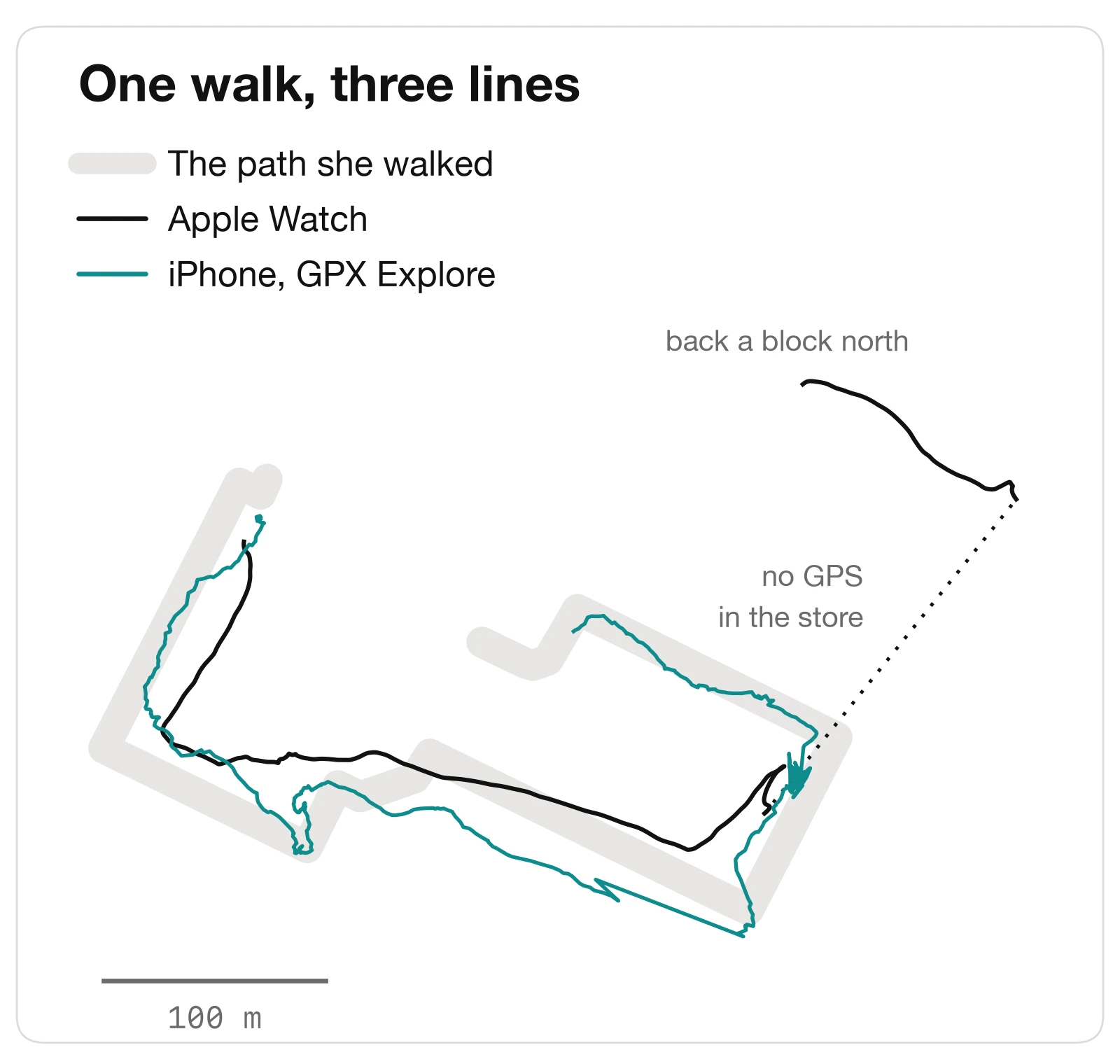
So one of our testers took a walk downtown in Pittsburgh: fourteen minutes around a few blocks, with a stop in a store. GPX Explore recorded on her iPhone while her Apple Watch recorded a workout. Afterward she drew, in GPX Explore, the path she had actually walked. That is rare to have: one walk, two recordings and the truth.
What each one got right
For the first seven minutes the watch’s line is the calmer one. It cuts corners and sits a little off the street, but it never wanders. Then she went into the store. The watch lost GPS for almost four minutes, and when it found it again it put her a block north and drew the rest of the walk along the wrong street.
The iPhone’s line wanders more, but never far: between the towers it zigzags back and forth across her path. It came out of the store where she did and followed her back. Measured against her drawing, the iPhone was a median of 7.7 meters (25 feet) from where she walked, the watch 20.7 meters (68 feet). On the way back from the store it was 3 meters against 131.
“Matched with GPX way better,” she told me. The line did. The numbers did not.
What the iPhone got wrong
GPX Explore said 0.80 miles for a walk of 0.60, and 424 feet of climbing on streets that are flat. Her watch said 16 feet.
Test builds of GPX Explore write down every fix the phone hands the recorder: where it was, how sure the phone was of it, the speed it reported, and what the recorder did with it. The log of her walk showed three separate problems.
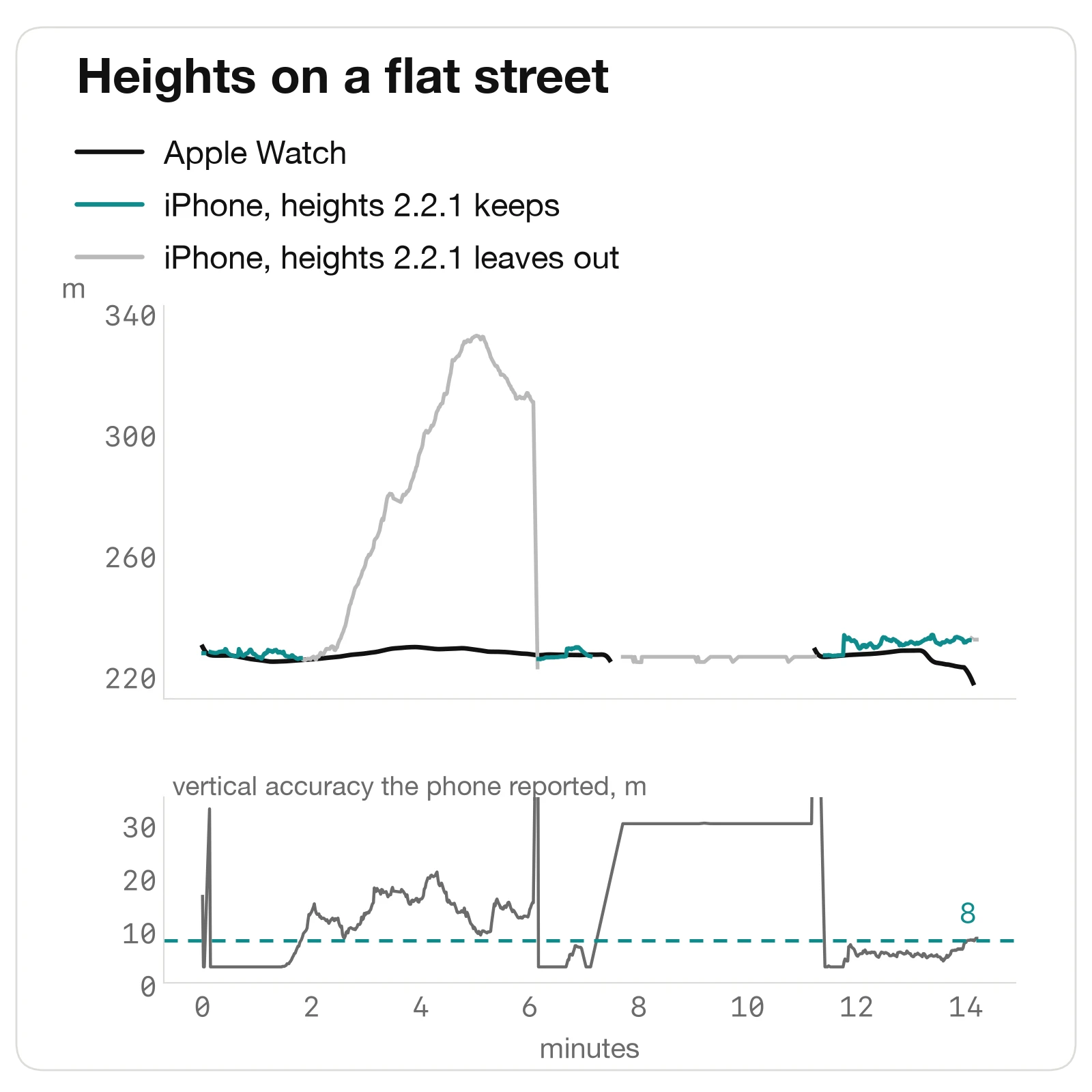
The heights drifted, and the phone knew it. Between minutes two and six the phone’s altitude rose 104 meters, 340 feet, on a level street, then dropped back in a single step. All the while the phone reported its vertical accuracy as 10 to 21 meters; on her good fixes it said 3. GPX Explore used every height anyway.
The store drew a walk. Inside, the phone fell back to fixes with no speed and an accuracy of 26 to 40 meters, which is what positioning from Wi-Fi looks like. Each one landed somewhere inside that circle. The recorder already ignores a phone that measures itself standing still, but these fixes carry no speed to measure, it let them through after the first few, and about 200 meters of wandering inside a shop went into the distance.
The zigzag added up. Before the store the phone recorded 828 meters for 649 walked. Each fix sat a few meters to one side of the last, well inside the accuracy the phone reported, so none of them looked wrong on its own. Together they made that part of the walk 28 percent longer.
What 2.2.1 changes
Two rules, from that log:
- A height counts only when the phone says it is good to 8 meters or better. On her walk the climb drops from 424 feet to 30, about what her watch’s track gives by the same count; the drift is simply left out. Until a recording has a height good enough, it shows no climb rather than zero.
- A fix with no speed is taken only once it has moved farther than its own accuracy. Standing in a store no longer draws a walk; walking out of it still does.
Replayed through 2.2.1, her walk reads 0.68 miles instead of 0.80, with 30 feet of climbing. My open-sky walk comes out the same distance as before, and its climb within a meter.
Two smaller things came out of the same testing. During a long stop the recording stays on the Lock Screen instead of dimming as if it had ended. And the log of every fix now survives however a test recording ends, which is how we will keep finding the next problem.
And one from my own testing of the editor. On a route drawn along roads or paths, dragging any point now finds the route again through it, not only the points I clicked, and a recording next to it is never drawn over. GPX Explore keeps the points you placed in the file, so it works the same when you open the file again.
The watch is not the truth either
It would be easy to call the watch right and the phone wrong, and neither is. Apple’s 0.52 miles is not even the length of the watch’s own line, which is 0.56, and that line went a block astray after the store. On my open-sky walk, measured over the same 26 minutes, the iPhone’s line is 2.5 percent longer than the watch’s, and most of that looks like the same one-second zigzag, smaller.
That zigzag is what is left: her walk still reads 13 percent long. Fixing it means smoothing the line with the speed and heading the phone reports, without cutting the corners a walk really turns, and we are trying that on these logs before anything changes in the app.
Record a Track is free on iPhone and iPad. Viewing any GPX file is free too; drawing, editing, riding turn by turn and the 3D view are GPX Explore Pro.