Geo Measure 4.0: free, in layers, and on foot
Geo Measure has cost a few dollars since 2011. For fifteen years that was a fair trade for the answer to one question, how many acres is that field. But a price in front of the first tap means most people never find out whether the app is right for their field, and the answer alone is something you can get in a browser today, on our own geosq.com among other places.
So Geo Measure 4.0 is free, and the free part is not a demo. Every file holds one measurement, an area, a distance or a circle, and that measurement gets the whole app: tap and drag and bend, Freehand, routing along roads and paths with the travel time, the points table with typed coordinates and nudges, every unit, GeoJSON and a picture of the map. If you need one field measured, you never have to pay.
Geo Measure Pro
The rest is Geo Measure Pro, one purchase in the app, no subscription, shared with your family. It is the part of Geo Measure that turns a measurement into a piece of work:
- more measurements in the same file, as layers;
- printing, and the PDF report with the map, every shape and every point;
- KML for Google Earth, GPX for a GPS, CSV for a spreadsheet;
- walking the boundary.
Menu items that need Pro say so before you choose them, and the Pro screen only opens when you ask for one of them. When you buy, what you asked for carries on: the new shape starts, the export goes ahead.
If you bought Geo Measure, you already have Pro. The app asks the App Store whether your Apple Account bought it before it became free, and unlocks Pro for good when it did. If it does not show, Restore Purchases in Settings asks again. The same goes for everyone who bought Geo Measure for Mac since 2013: that edition is free now too, with its own Pro, and an earlier purchase unlocks it.
Layers
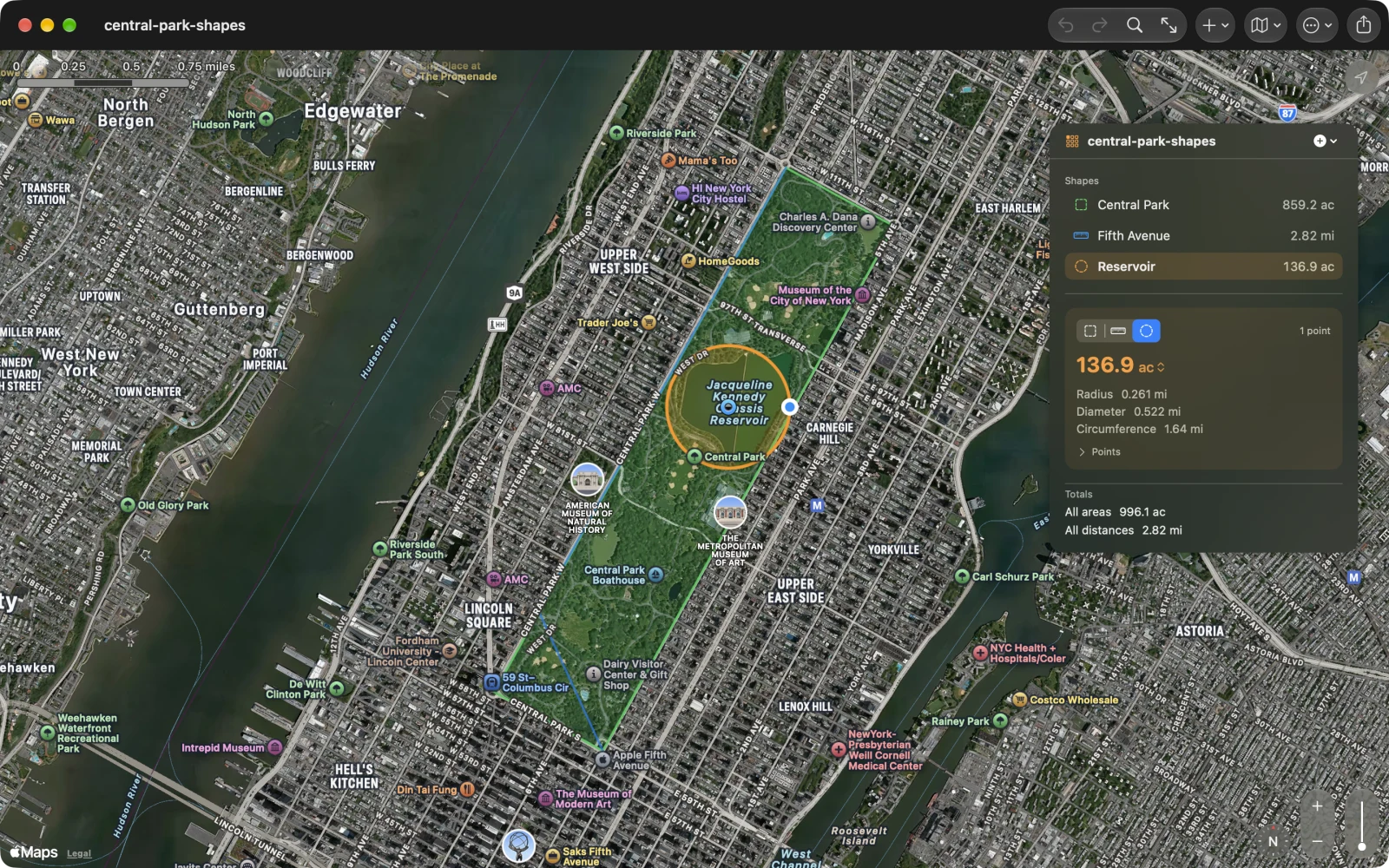
Geo Elevation taught me this one first. Once a file holds the north field, the fence line and the sprinkler’s reach, you want to put one of them away for a while without deleting it, and you want the small plot drawn on top of the big field, not under it. In 4.0 every measurement is a layer, as in a drawing app. The eye beside it hides it. Drag it above or below the others, or use Arrange (⌘] and ⌘[ on the Mac). Double-click it and the map zooms to it.
A hidden layer stays out of the totals, the pictures and the printed report, so you can print the fields without the fence. It stays in the file, and the GeoJSON and KML you export remember that it was hidden.
Walk the boundary
Geo Measure 3 could already walk a boundary, but only with the screen on and the app in front of you: lock the phone and the walk stopped. That is no way to walk a field.
GPX Explore solved the same problem this autumn for recording tracks, on walks our testers took between tall buildings and through phone calls at street corners. Geo Measure 4.0 walks with the same engine. On iPhone and iPad, choose Walk the Boundary, put the phone in your pocket and walk the edge. It keeps a point every few meters with the screen locked, leaves out the positions a phone gets wrong, and shows the distance and the area so far. When you come back to where you started, it offers to finish.
I was careful about one thing above all: a walk must never be lost. Nothing goes into your document until you stop, so an accidental undo cannot eat half a field. If iOS closes the app on the way round, the walk carries on when it starts again. And every walk is also saved as a file of its own, in Files › On My iPhone › Geo Measure › Walks, whatever happens later to the measurement it went into.
On the Mac and Apple Vision Pro, Track My Position adds points as you move, as before. Walking the boundary is part of Geo Measure Pro.
Where it opens
On iPhone and iPad, Geo Measure opens on a start screen instead of an empty map: measure an area, measure a distance, walk the boundary, open a file or the sample, or pick up one of your recent files. On the Mac (macOS 15 and later), a welcome window does the same, with a thumbnail of each recent file.
Files that show what is in them
In Files and in the Finder, a Geo Measure document now shows its own shapes, in their colors, with the first one’s number at the foot, and Quick Look opens it without the app: the shapes, a scale and a list of every measurement. I first drew them on the real contour lines of each place, from our elevation server, until the obvious question came up: a folder of a hundred files would send it a hundred requests. So every file gets the same made-up hillside in brown contours, drawn on your device, asking nobody.
And
- On the Mac, map pictures, prints and PDF reports had drawn the shapes mirrored, top to bottom, over their map since 3.0. They sit where they belong now.
- On iPhone and iPad, Import and Export work. In 3.0 and 3.1 they did nothing.
- The print sheet shows the page before you print it: the map style, the labels, the tables.
- Search finds mountains and lakes, and frames the whole place.
- Opening a file fits the map to it.
- The sample’s Fifth Avenue ran down Central Park West. It runs down Fifth Avenue now.
Geo Measure 4.0 is free for iPhone, iPad, Mac and Apple Vision Pro, and Geo Measure for Mac is free on its own record, each with its own Geo Measure Pro. Both are in English, German, French, Spanish and Japanese. The Geo Measure page has sample files to try, and the guide covers every menu, Pro and the walk.