iRetroPhone 3: the 2008 app, done properly
On July 10, 2008, the day the App Store opened, iRetroPhone was one of the roughly five hundred apps on it. It drew a rotary dial on the screen. You put a finger in a hole, pulled it to the stop and let go; it spun back clicking, and then it actually placed the call. Four days later Saul Hansell wrote in the New York Times Bits blog that it was “the goofiest $2.99 I’ve spent so far.” That week a friend of ours stood in the iPhone 3G line wearing the iRetroPhone t-shirt.
The idea came out of a conversation. Kiichi had started playing with the iPhone SDK in March 2008 and we needed a first app. Our friend Chris League mentioned that one of his students had said the old rotary phones were more reliable than cell phones. That was the whole pitch.
Eighteen years later the app was still selling, still on the same listing, and still the Objective-C code from 2011: manual reference counting, a 320×480 XIB laid out in absolute frames, artwork at 1× and 2×, letterboxed on every current iPhone. Version 2.2 in June 2025 fixed the sound, and that was as far as patching could go. The dial images could not grow. A rewrite was cheaper than another patch.
Two wrong turns first
I spent a while making it “better”. A walnut housing. Bakelite. Ivory, cherry, steel. Swatches on the main screen to switch between them. Every one of them looked like a rendering of a phone rather than a phone, and every one repeated a mistake we had already made once: the old app’s wood and metal skins were the thing users called unrealistic, while the plain 2008 screen was the one people kept.
So the direction I settled on, after throwing two passes away, was simple. The 2008 app, done properly. A white rotary dial on pure black, as large as the width allows. The dialed number in thin white digits above it. Three quiet controls below: Contacts, Call, Settings. Nothing else on the screen.
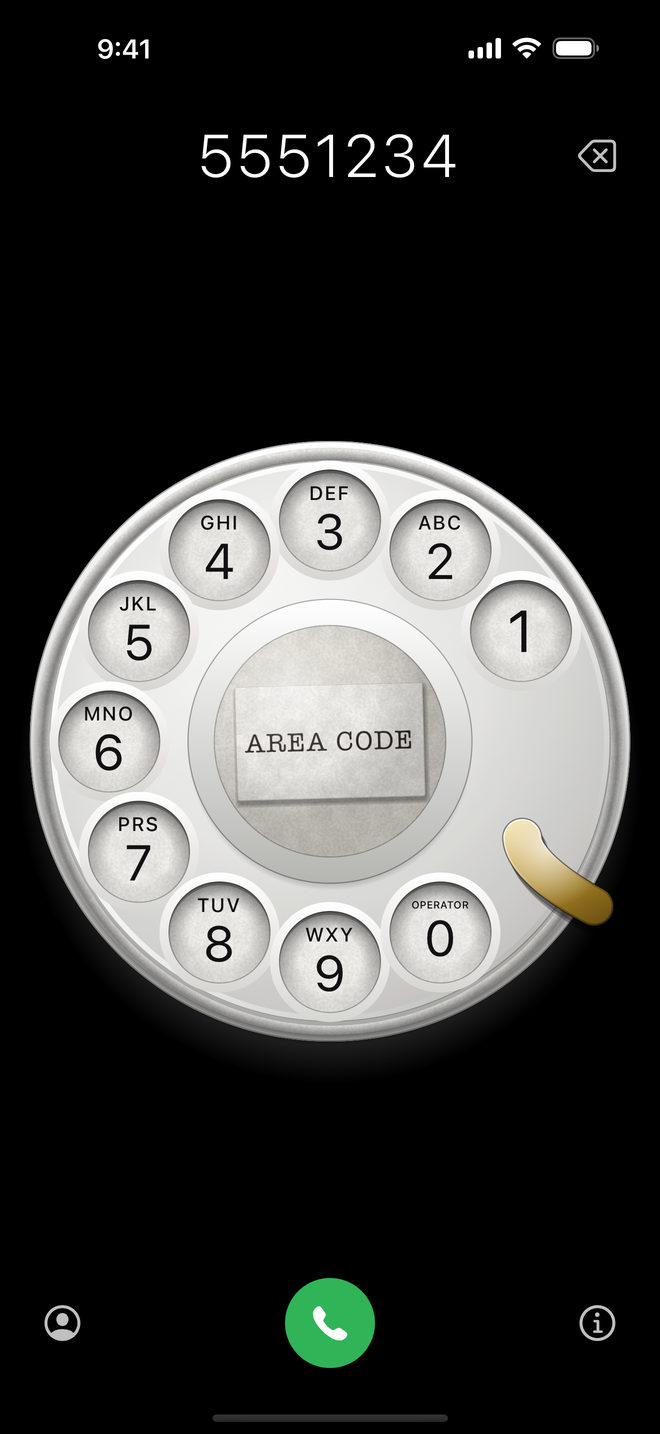
A real dial
“Done properly” meant measuring a real Western Electric dial instead of drawing something dial-shaped. Ten holes, thirty degrees apart, each 0.17 of the dial’s radius. The 1 rests at 60 degrees and the finger stop sits at 120, so the 1 travels 60 degrees and the 0 travels 330. Each digit is centred in its hole with its letters printed straight above it, ABC through WXY, OPERATOR over the 0, and no Q or Z, because there never was. Under the clear cap in the middle is a paper slip, typed, set a degree and a half off square, reading AREA CODE until you type your own. The finger stop is brass and bends back toward your finger.
Only the finger wheel moves. The number plate, the card and the stop stay put, which is what makes the mid-turn shot look right: the numbers hold still and the dial turns over them.
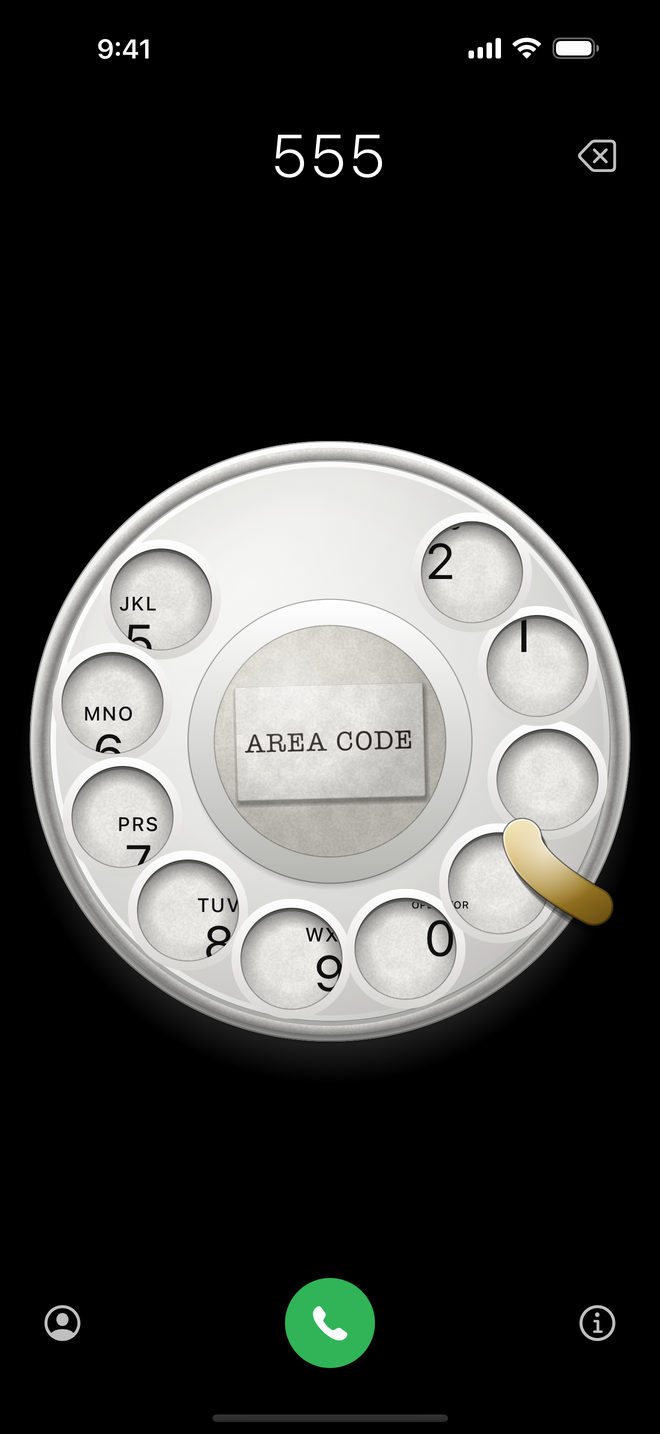
The interaction is measured too. Touch a hole and the wheel follows your finger exactly, clamped between rest and the stop. Let go within 12 degrees of the stop and the digit dials; let go short of that and nothing dials, but the wheel still returns. A tap on a hole pulls the digit to the stop by itself. The return is governed at 280 degrees per second, which is 9.3 pulses a second, close to the ten of the real mechanism, and it clicks once at each pulse position on the way home. The last 45 degrees are silent.
The sound
The old app played four recorded clips, picked by how far you had turned. Version 3 keeps two recordings from 2008, the clack when the wheel lands and the hang-up, and synthesizes everything else. A click is a burst of noise for the impact plus a few damped resonances for the parts ringing. The ratchet tick fires every 4.5 degrees while you turn and gets louder the faster you go. The pulse click fires at 45, 75, 105 and so on up to 315 degrees on the way back. A whirr loops under the return. Haptics run alongside: a light tick per tooth, a rigid thump at the stop, a heavy one when the wheel lands.
Getting all of that to not stutter on a real phone took longer than drawing the dial:
- Never stop an audio player node.
AVAudioPlayerNode.stop()blocks on the render thread. So twelve voices are created once, used round-robin, and never stopped. Every click is scheduled on absolute host time; scheduling on the engine’s clock parks a buffer in the future and silently locks that voice. - No shaders or blurs while the wheel turns. Core Animation re-evaluates them every frame. Materials are gradients plus two small tiled noise images generated once at launch.
- Rotate shapes, not views. The wheel’s shapes rotate, so highlights, shadows and hole bevels stay lit from the upper left wherever the wheel is.
- Core Haptics, not feedback generators. UIKit’s feedback generators go through a reporter capped at 32 messages a second. A pull to zero exceeds that.
- Frame-driven motion. A display link drives every wheel move at 60 to 120 Hz, so the clicks land at the physically right angles instead of wherever an animation curve put them.
It really calls
Contacts opens the system picker, restricted to phone numbers, so the app never asks for Contacts permission. Pick a number and the dial pulls each digit itself, pausing at the stop and again between digits. Touch the wheel while it is doing that and it stops. The call goes out as a tel: link, so the Phone app places it and iRetroPhone never sees your call.
Watch it dial 2008 by itself:
Settings, on their own screen
The two things I did add live behind the Settings button. The paper slip’s text is yours; the hint suggests the old exchange style, LAkewood 3697. And there are five table surfaces to put under the dial: black, graphite, green felt, oxblood and navy. The dial never changes with the surface. That is the rule.
What is under it
SwiftUI, iOS 17 or later, iPhone only and portrait only, like the original. No dependencies, no accounts, no analytics. Every angle, speed and tolerance above is written down in one spec that the app implements and the site describes, so the two cannot drift apart. The site, iretrophone.com, was rewritten as plain HTML and one stylesheet, and it plays the dial for you.
Version 3 ships as an update to the same 2008 listing, so if you paid $2.99 back then, this one costs you nothing. Take your iPhone back to the 20th century.