Open it. The dial stays put.
When you open an iPhone Duo, you should not have to find the thing you were just touching. That was the starting point for iRetroPhone 3.2: keep the dial on the right, at the size it was when the phone was closed, and use the other half for something that belongs beside an old telephone.
A paper card.
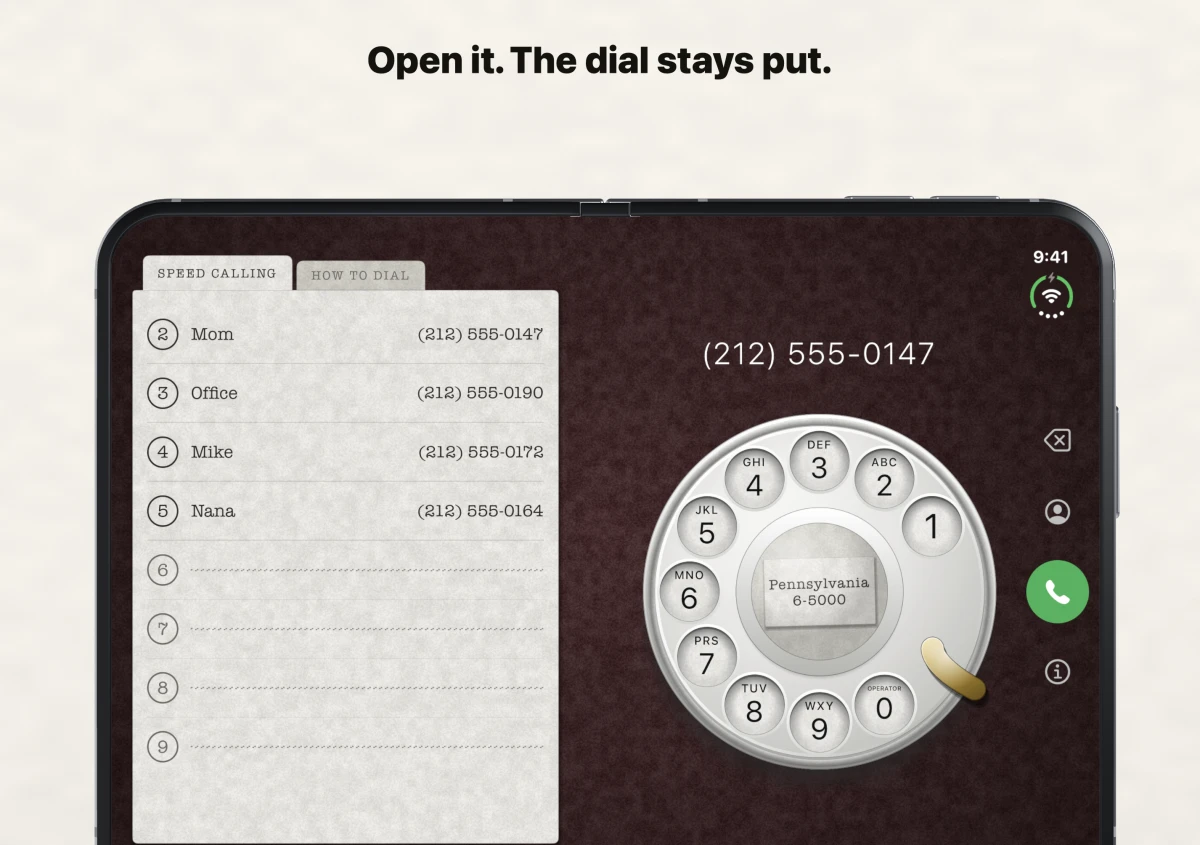
Eight numbers, starting at 2
The card has two tabs. Speed Calling holds eight names and numbers under the digits 2 through 9, the same numbering used by the phone company’s old Speed Calling service. Tap a name and watch the wheel dial the whole number before handing the call to the Phone app.
Fill a line from the system contact picker or use the number you have already dialed. The saved names and numbers stay on your phone. The app does not ask for access to your whole address book.
The instructions are beside the dial
The other tab is How to dial. Its four steps stay on the paper while the real dial demonstrates them. Tap the card to see the finger turn the wheel to the stop and let go.
Hold the open phone upright and the card moves above the dial. The dial keeps its familiar size. Close the phone and Delete, Contacts, Call and Settings stand down the side.
The phone handles the fade as it opens. iRetroPhone keeps your place, including the number you were dialing.
A red table
The default table is now oxblood, the deep red behind the dial in these pictures. If you have already chosen a table, your choice stays. Black, graphite, green felt and navy are still in Settings.
iRetroPhone is the same app that opened with the App Store in 2008, with its original landing clack and hang-up sound. The dial, the lesson and the paper card speak English, German, French, Spanish, Italian and Japanese.